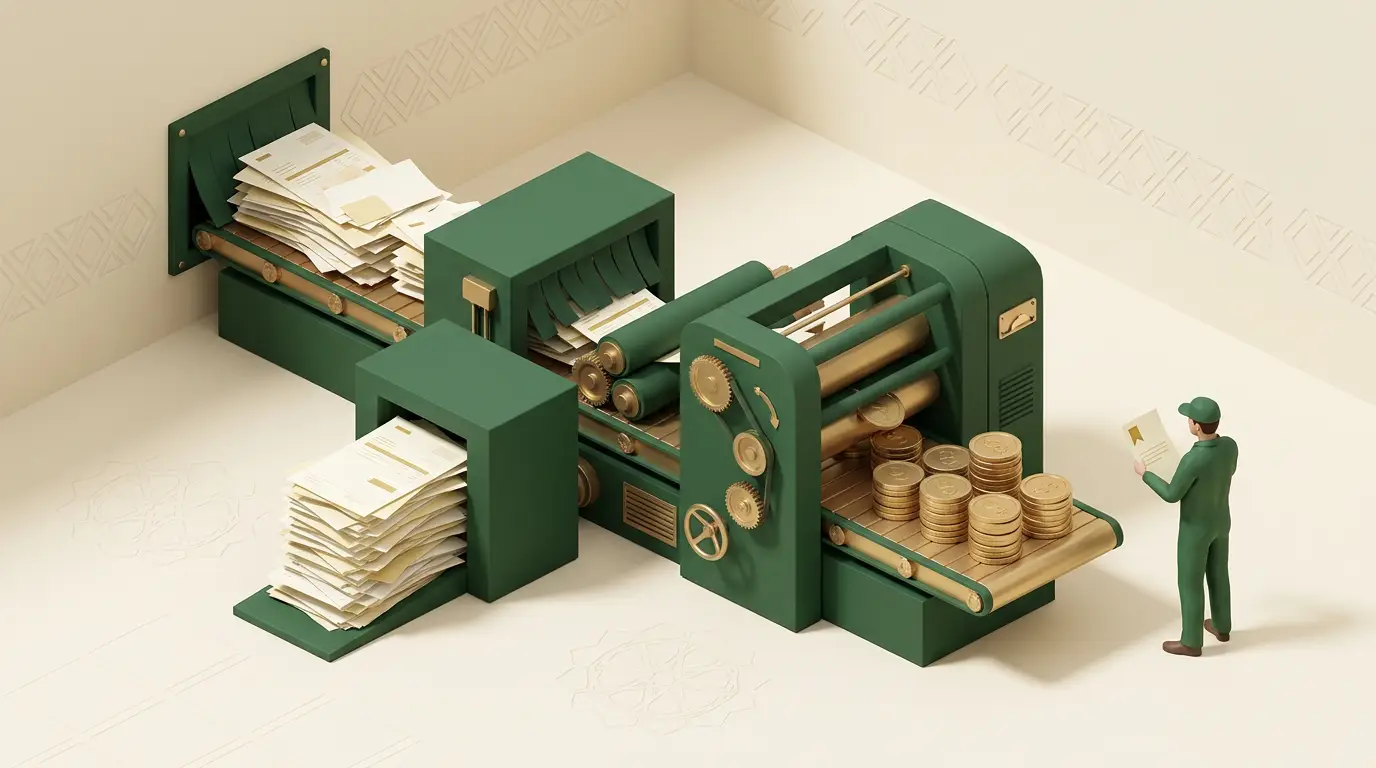
Every vendor will tell you AI slashes costs. Most of the time it just adds a subscription. The companies that actually save money with AI aren’t doing “AI everywhere.” They pick a few specific jobs that are expensive, repetitive, and done by hand today, and they let AI grind those down. That’s the whole game.
So let’s be concrete about how AI saves money, which systems do it, what they’re worth, and where the savings quietly turn into a new cost.
Three ways AI actually cuts costs
Strip away the hype and there are only three. Every real saving is one of these.
flowchart TD
  A(["How AI saves you money"]) --> B(["1. Does repetitive work you pay people to do by hand"])
  A --> C(["2. Catches errors before they cost you rework or penalties"])
  A --> D(["3. Lets you do at scale what you couldn't afford to do manually"])
  B --> B2(["Fewer hours on the boring stuff"])
  C --> C2(["Less rework, fewer refunds and fines"])
  D --> D2(["Grow without adding headcount"])
The first one is the obvious one and usually the biggest: labor. You’re paying skilled people to key in invoices, answer the same five questions, and copy numbers between systems. The second is quieter but real: mistakes cost money, and catching them early is cheaper than fixing them late. The third is the one owners underrate. AI lets you do things that were never worth a person’s time, like reading every contract or checking every transaction, so you grow without growing the payroll in lockstep.
The honest catch
Saving money with AI is not automatic. Most companies now use AI in some form, but far fewer see it actually move the bottom line. McKinsey’s State of AI found that while a majority of organizations use generative AI, only around 39% report an enterprise-level EBIT impact from it so far, and only about 5 to 6% are genuine “AI high performers” (McKinsey, 2024). The gap between “we use AI” and “AI saves us money” is the whole subject of this post. The winners aren’t using more AI. They’re pointing it at the right work.
Where AI actually cuts costs: the systems
Here’s the practical part. These are the systems that reliably reduce manual labor for normal businesses, not science projects. For each, the pattern is the same: a high-volume task that humans do by hand, where AI handles the routine cases and a person handles the exceptions.
- Customer support triage and deflection. An AI assistant answers the repetitive questions (where’s my order, how do I reset this, what are your hours) and routes the rest to the right person with a summary attached. Your team stops drowning in tier-one tickets and spends time on the ones that need a human.
- Document and data entry. Invoices, receipts, forms, and PDFs get read and turned into structured data automatically. This is the single most common labor saver we see, because almost every company still pays people to retype information that arrived as a document.
- Finance back-office. Matching payments to invoices, flagging mismatches, reconciling accounts, and drafting the monthly report. The clean cases clear themselves; a person reviews the handful that don’t.
- Contract and compliance first-pass review. AI reads every contract or policy and flags the risky clauses and missing terms for a human to check. You go from reading 10% of your contracts carefully to screening 100% of them quickly.
- Sales and marketing groundwork. Qualifying and scoring leads, drafting first-version proposals and replies, and personalizing outreach. The expensive humans spend their time closing, not formatting.
- Operations and forecasting. Demand forecasting, inventory optimization, and predictive maintenance that warns you a machine is about to fail. Here the saving is avoided cost: less dead stock, less downtime, fewer emergencies.
- IT and engineering. Coding assistants, log and alert triage, and auto-resolving common support tickets. The team ships more without the headcount the old math required.
Notice what these have in common. High volume. Repetitive. A clear “right answer” most of the time. And tolerant of a human checking the edge cases. That combination is the sweet spot, and we’ll come back to it.
What that looks like as effort
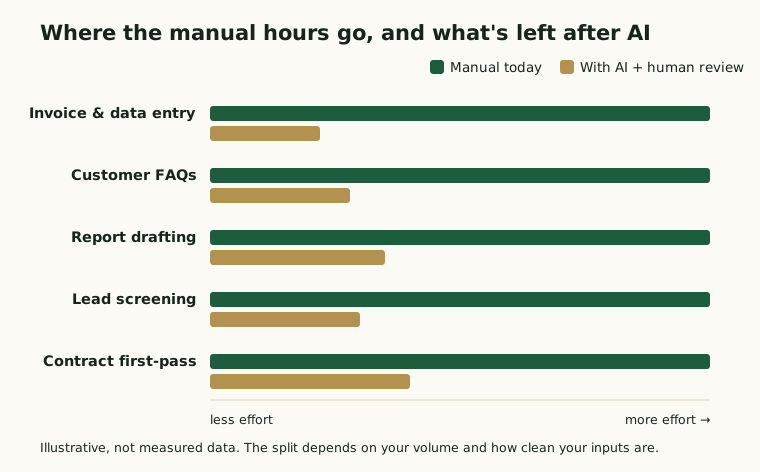
The point of all of this is to move work off people. Here’s the shape of it: the tall bars are the manual hours a task eats today, and the short bars are what’s left once AI handles the routine cases and a person reviews the rest.
Don’t forget the cost of the AI itself
Here’s where a lot of “AI savings” pitches fall apart. The gross saving, the hours you remove, is not your real saving. You have to subtract what the AI costs to build, to run every month, and to oversee. Your actual win is what’s left.
flowchart LR
  A(["Manual hours removed"]) -->|the gross win| B(["minus build: setup + integration"])
  B -->|minus| C(["minus run: usage + hosting, every month"])
  C -->|minus| D(["minus oversight: a human on the exceptions"])
  D --> E(["= your real, net saving"])
This is exactly why so many AI efforts disappoint. Gartner predicts at least 30% of generative AI projects will be abandoned after proof of concept by the end of 2025, often over escalating costs and unclear business value (Gartner, 2024). The projects that survive are the ones where someone did this subtraction honestly before they started. If a vendor only ever shows you the gross number, they’re selling, not advising.
A worked example
Let’s put numbers on one. Say you process 2,000 supplier invoices a month. By hand, each one takes about 6 minutes to key in and check, so that’s roughly 200 hours a month of someone’s time. You add an extraction system: it reads the clean invoices (call it 80% of them) and routes the messy 20% to a person. Now you’re paying for about 40 hours of review a month, plus the software and a one-time build to wire it into your accounting system.
The build is a cost upfront, so month one is negative. Then every month after, you’re saving most of those 160 hours. The line climbs until it crosses zero, and that crossing point is your payback. After that, it’s money in the bank.
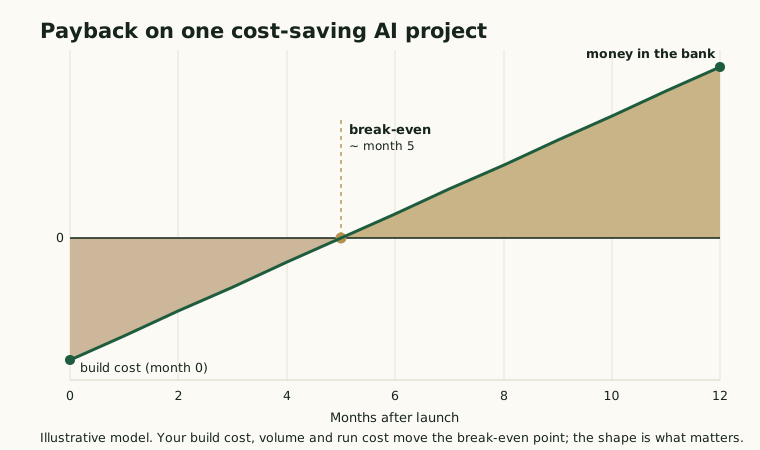
The numbers are made up to show the shape. The lesson isn’t the exact month. It’s that a real cost-saving AI project has a build cost, a monthly run cost, and a break-even you can actually point to. If you can’t sketch this curve for a project, you don’t understand it well enough to fund it yet.
The test: which work is worth automating
Not every task is a good target. The ones that save money sit in a specific corner: high volume, and tolerant of a human catching the occasional error. The ones that burn money are low-volume bespoke work (the oversight costs more than you save) or zero-error, high-stakes tasks you’d be reckless to fully automate.
quadrantChart
  title Which work is worth automating
  x-axis Low volume --> High volume
  y-axis Needs perfection --> Tolerates a checked error
  quadrant-1 Automate first
  quadrant-2 Human in the loop
  quadrant-3 Not worth it
  quadrant-4 Careful, high stakes
  "Invoice and data entry": [0.85, 0.72]
  "Customer FAQs": [0.9, 0.66]
  "Report drafting": [0.7, 0.74]
  "Lead screening": [0.78, 0.8]
  "Bespoke contracts": [0.28, 0.32]
  "Payroll sign-off": [0.62, 0.12]
  "Compliance approval": [0.45, 0.1]
Start in the top right. That’s where the cheap, durable wins live.
Where AI does not save money
It’s worth being just as clear about the traps, because they’re where budgets go to die.
- Low-volume, bespoke judgment work. If a task happens twice a week and needs real expertise each time, automating it costs more in setup and oversight than you’ll ever save. Leave it to your expert.
- Zero-error, high-stakes tasks run fully autonomously. Anything where a single mistake means a fine, a safety issue, or a lost customer needs a human in the loop. The one error can wipe out a year of savings.
- “AI for everything.” Buying a pile of AI tools nobody adopts costs the same as ones they use and returns nothing. Adoption, not the licence, is where the value is or isn’t.
- Ignoring the run cost. A cheap build with an expensive monthly run can cost more over a year than doing it the old way. Always price both.
How to start without wasting money
The pattern that works is boring and reliable. Pick one process that’s high volume and repetitive. Measure what it costs you in hours today, honestly. Run a small, contained pilot on that one thing, with a human reviewing the AI’s work. Then measure the net saving, not the gross. If it pays back, you’ve found your model and you scale it. If it doesn’t, you’ve spent a little to learn something cheap, instead of betting the budget on a slide deck.
Saving money with AI isn’t about being first or buying the most. It’s about pointing a narrow, well-built system at an expensive, repetitive job, and keeping a person on the exceptions. Do that two or three times and the savings compound. That’s how the high performers got there, one paid-back project at a time.
Want to know which job in your business AI would actually pay back, and which ones to leave alone? SDCG helps owners find the first cost-saving AI project, model the real net saving, and build it. We don’t resell software, so the numbers aren’t bent toward a product. Book a free 30-minute review.